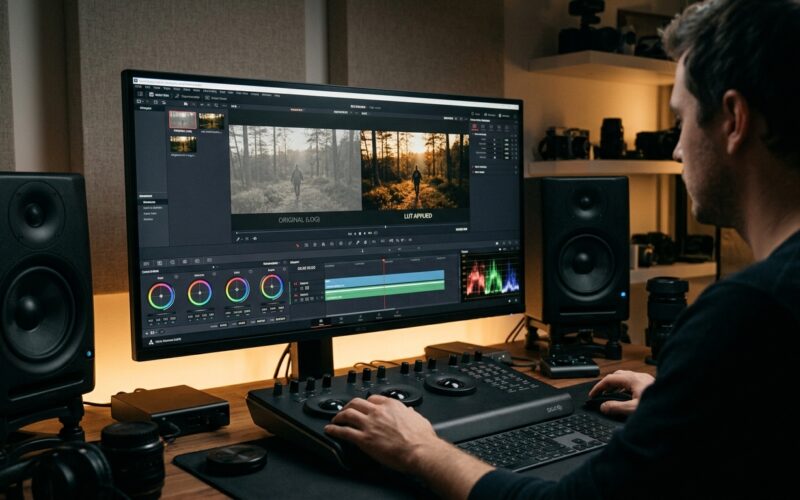
How Modern Businesses Set Up In-House Video Workflows
Modern companies increasingly rely on visual communication to explain complex products, onboard clients, and share updates with their audience. Outsourcing every single recording to third-party production agencies often leads to extended turnaround times and inconsistent project schedules. Developing an internal recording system allows growing enterprises to respond swiftly to operational needs while maintaining complete control over their brand messaging.
Creating an internal video pipeline does not require constructing a broadcast television studio. Instead, organizations can assemble a dependable, practical setup within an existing office or spare conference room. By understanding how to select reliable equipment, standardize technical processes, and support team members through production, businesses can establish a sustainable media workflow that serves multiple departments.
Choosing the Right Recording and Audio Hardware
The core of any media setup is the recording instrument, but business operators should resist the temptation to purchase complex cinema rigs. Dedicated studio cameras designed for solo operators offer rapid autofocus, simple menu navigation, and clean video output for recorded presentations. Reviewing comprehensive specifications and side-by-side equipment comparisons on bestcameraworld.com helps decision-makers identify dependable gear that non-technical personnel can operate with minimal instruction. Selecting equipment with clear tally indicators and reliable tracking ensures that presenters stay in focus even when recording without a dedicated camera crew.
Audio quality is equally important because poor sound ruins an otherwise professional presentation. Clear spoken dialogue requires a directional microphone placed close to the speaker. Lavalier microphones that clip onto clothing work well for mobile demonstrations, while desktop dynamic microphones provide rich, warm vocal capture for seated presentations. Pairing these microphones with simple audio interfaces eliminates background hiss and provides physical volume knobs that team members can adjust intuitively.
Lighting completes the foundational setup. Overhead office fluorescent fixtures cast unflattering shadows and flicker on camera sensors. Introducing a balanced key light equipped with a diffusion dome creates soft, even illumination on the subject. Adding a secondary fill light or reflective bounce board softens remaining shadows, resulting in an inviting look that immediately distinguishes internal recordings from casual webcam calls.
Organizing Studio Spaces and Hardware Management
A dedicated physical space removes the friction of assembling and dismantling tripods before every recording session. Converting a quiet consultation room or an unused corner of an administrative office provides a stable environment where lighting and camera positions remain locked. If an entire room cannot be spared, mounting equipment on rolling utility carts allows teams to deploy an organized studio in minutes.
Managing this equipment requires structured inventory protocols to avoid missing cords, depleted batteries, and damaged lenses. Much like the strategies businesses use to manage essential tech hardware, establishing a central equipment registry and color-coded storage bins prevents operational delays. Labeling each power brick, charging station, and connection cable ensures that staff members return items to their designated stations after wrapping up a project.
Acoustic management within the physical room also merits attention. Hard surfaces such as bare drywall, glass partitions, and polished floors reflect sound waves, creating hollow echoes in recordings. Adding thick area rugs, fabric-upholstered chairs, and strategically placed acoustic foam panels absorbs unwanted reverberations. These physical adjustments cost very little effort yet substantially elevate the clarity of spoken presentations.
Streamlining Everyday Editing and Desktop Workflows
Once video files are recorded, post-production workflows determine how quickly content reaches its intended audience. High-resolution video files place substantial demands on computer processors, memory modules, and internal storage drives. Business teams need straightforward file organization routines to prevent lost footage, broken project links, and sluggish desktop performance during editing sessions.
Maintaining efficient operating environments is essential for non-technical employees tasked with assembling footage. Exploring practical guides and computing advice on pc4sy.com helps administrative teams optimize operating system settings, clear cache drives, and troubleshoot common desktop bottlenecks that hinder creative work. Simple steps such as configuring fast external solid-state drives for project caching keep editing software running smoothly even on standard office workstations.
Standardized project templates also speed up turnaround times. Developing pre-built timelines with company logos, introductory title cards, lower-third graphic overlays, and royalty-free background audio tracks eliminates repetitive design decisions. Editors simply insert the fresh voice track and video cuts into the existing framework, maintaining brand consistency across all customer-facing materials.
Establishing a Practical Production Checklist
Consistency in media production relies on repeatable habits rather than artistic improvisation. Implementing a pre-flight checklist prevents common technical oversights, such as muted microphones or unformatted memory cards, from ruining an entire recording session. Team members should complete these steps before inviting presenters in front of the lens:
- Draft a concise speaking outline focused on primary takeaways rather than memorizing full scripts.
- Format memory storage cards inside the camera and confirm remaining recording capacity.
- Verify microphone battery levels and test ambient audio levels to avoid distortion.
- Position the primary key light slightly above eye level to ensure balanced facial illumination.
- Record a brief test clip to verify framing, focus lock, and sound clarity.
- Store raw video files immediately onto redundant external drives before leaving the studio.
Following this structured routine builds operational confidence across the entire department. When setup steps become mechanical, presenters can concentrate fully on their message rather than worrying about technical malfunctions or unexpected recording glitches.
Standardizing Media Archiving and Asset Security
As video output increases, managing finished deliverables and source files becomes a vital operational responsibility. Digital media consumes substantial storage capacity, making unstructured file storage unsustainable over the long term. Organizations should adopt a predictable folder taxonomy based on department, project title, and release date to ensure that any employee can locate specific assets quickly.
Implementing a tiered storage architecture protects valuable institutional knowledge. Active projects should reside on rapid local solid-state drives during the editing phase. Once an asset receives final approval and publication, teams should migrate the raw footage, audio tracks, and project files to centralized network-attached storage or secure cloud repositories. Establishing automated backup routines safeguards these creative investments against drive failures or accidental deletions.
Access management also plays an important role in brand security. Marketing leaders should restrict administrative permissions on primary video channels, allowing broader team members to contribute drafts while designating specific managers to authorize final releases. This balance maintains creative momentum without exposing public channels to unauthorized or unreviewed material.
Cultivating Internal On-Camera Confidence
The most advanced studio hardware provides little value if team members feel intimidated by the camera. Many employees hesitate to participate in video projects due to performance anxiety or unfamiliarity with teleprompters. Business leaders can alleviate this pressure by framing company videos as helpful conversations rather than theatrical performances. Encouraging presenters to speak directly to one specific colleague simplifies tone and reduces stiffness.
Conducting low-stakes practice runs helps staff adapt to studio lighting and microphone positioning. Reviewing early takes constructively and focusing on clarity rather than perfection creates an encouraging workplace culture. Over time, employees across customer support, engineering, and sales become comfortable sharing their specialized insights through regular video updates.
Establishing an internal video production workflow transforms how modern organizations connect with customers, train employees, and document internal knowledge. By combining sensible hardware, disciplined file management, and an organized production routine, growing enterprises can produce compelling video content consistently. A thoughtful, step-by-step approach ensures that visual media becomes an enduring operational asset that strengthens business communication for years to come.